
Put StudioPartner on your phone
Add StudioPartner to your home screen so it opens like an app, with one tap.
StudioPartner runs in your browser, so there is nothing to download from an app store. You can still put it on your home screen, where it gets its own icon and opens full screen with no address bar — the same as any other app.
Worth two minutes. A browser tab gets lost behind twenty others; an icon on your home screen does not.
Before you start
Install it from my.studiopartner.app — the page you log in to.
Not from studiopartner.app, which is the website that tells people about StudioPartner. Adding that one gives you a shortcut to a sales page.
Quickest way to be sure: log in first, then follow the steps below from any screen inside the app.
On Android
Open my.studiopartner.app in Chrome and log in.
Most of the time a bar slides up from the bottom saying Install StudioPartner. Tap Install, then confirm. Done.

If you dismissed that bar, or it never appeared:
- Tap the ⋮ menu at the top right of Chrome
- Tap Install app — on some versions it reads Add to Home screen
- Tap Install
The icon lands on your home screen. From then on it opens without the address bar.
On iPhone or iPad
You must use Safari. This is the one step people get stuck on: Chrome on an iPhone cannot add anything to the home screen. Apple only allows Safari to do it. If you normally use Chrome, open Safari just for these two minutes.
Open my.studiopartner.app in Safari and log in. Then:
- Tap the Share button — a square with an arrow pointing up out of it

- Scroll down past the sharing options and tap Add to Home Screen
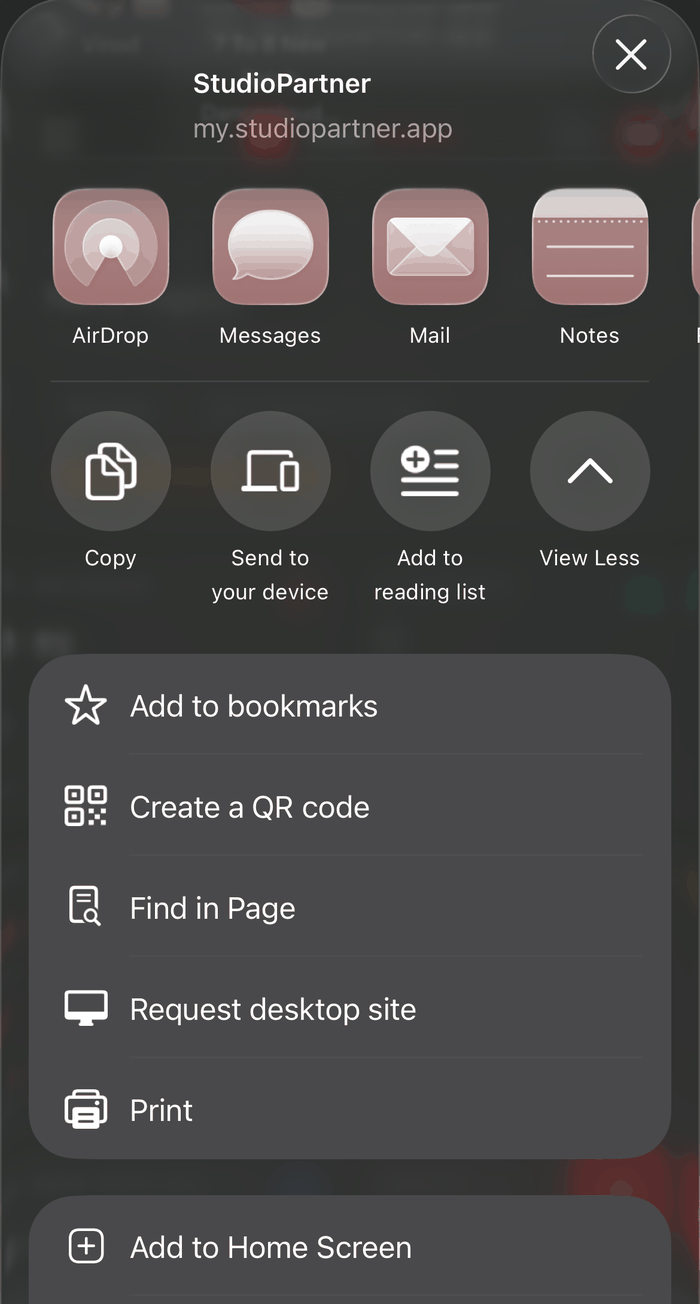
- Tap Add at the top right
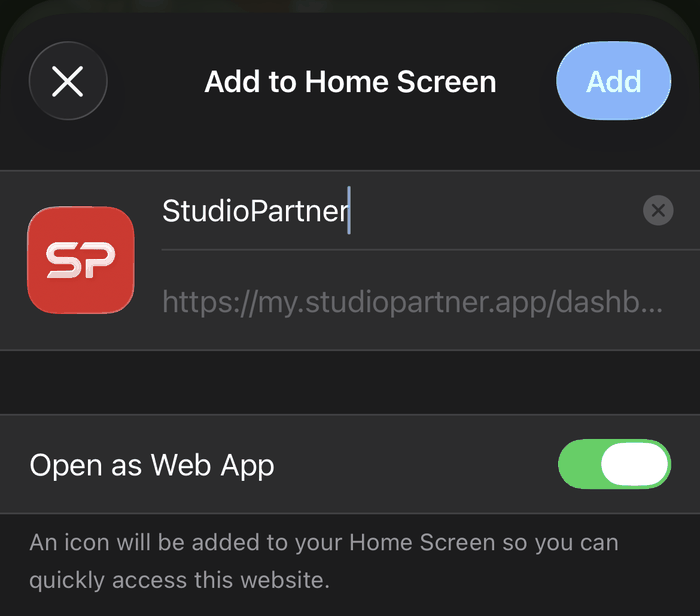
Leave Open as Web App switched on. That is what makes it open properly full screen instead of as a plain bookmark inside Safari.
Cannot find the Share button? It sits in different places depending on your iPhone. Usually it is at the right-hand end of the address bar, as above. On some it is in the bar along the bottom of the screen instead, and on others it is behind the ⋯ button at the bottom right — tap that, then Share.
"Add to Home Screen" isn't in my list. Scroll right to the bottom of that list and tap Edit Actions, then add it. It stays there for next time.
On a laptop
Open my.studiopartner.app in Chrome or Edge and log in.
Look at the right-hand end of the address bar for a small install icon — usually a monitor with a downward arrow. Click it, then click Install.
No icon there? Open the ⋮ menu and look for Install StudioPartner or Cast, save and share → Install page as app.
StudioPartner then opens in its own window, like any desktop program.
Safari and Firefox cannot do this. There is no install option in either. Bookmark the page instead, or use Chrome or Edge if you want the app window.
What changes once it is installed
- Its own icon, alongside your other apps
- Opens full screen — no address bar taking up room
- Faster to open, because it is already loaded
- Screens you have already visited still open if your connection drops, with a banner telling you that you are offline
You are still signed in to the same studio, with the same data. Nothing separate is created.
Removing it
It uninstalls like any app: press and hold the icon, then choose Remove or Uninstall.
That removes the shortcut only. Your studio, your students and your records are untouched — sign in through a browser at any time and everything is exactly where you left it.
If it does not work
No install option anywhere. Check the address bar says my.studiopartner.app. The install option only appears on the app itself, and only over a secure connection.
On an iPhone and no Share option. You are almost certainly in Chrome rather than Safari. Only Safari can do this on iOS.
Installed, but it asks me to log in again. The home screen app is a separate browser session the first time it opens. Log in once and it stays signed in.
The icon opens the login page every time. Your phone may be clearing website data on a schedule. Check Settings for anything that clears browsing data automatically.
Still stuck? Message us on WhatsApp from the ? menu inside the app, and say which phone you are on.
Still need help? Email hello@studiopartner.app
All Help Articles